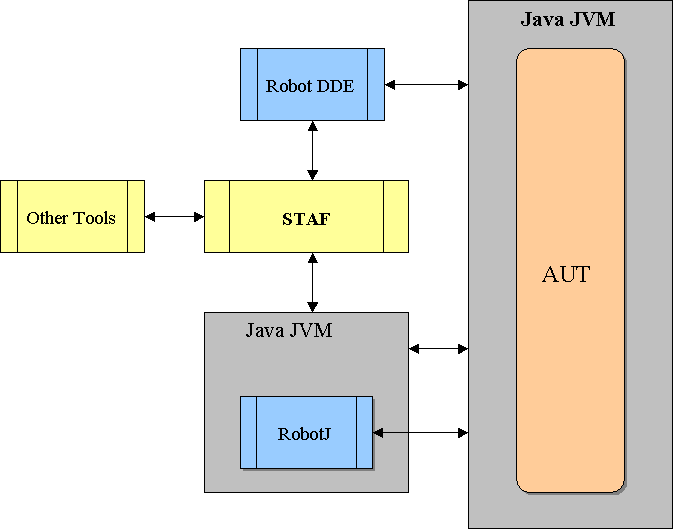
RobotJ integration into the RRAFS engine is striving to be transparent. That is, the RRAFS engine currently based on Rational Robot Classic will still contain the bulk of our functionality. The engine will only make calls to RobotJ Scripts and APIs if and when Robot Classic cannot satisfy the desired functionality, or if we instruct it to do so. (I will often refer to Robot Classic as simply "Classic" in the remainder of this document.) See more on the RRAFS RobotJ Implementation.
We have implemented STAF Services to provide access to RobotJ and ANY future SAFS Engine. These STAF Services provide standardized SAFS Engine support independently of either Classic or RobotJ. So these standard features will be available to other tools we may implement now or in the future.
|
|
| Fig. 1 |
Fig. 1 shows that Classic is still in the picture. In fact, Classic is still our primary Java support vehicle--though that can readily change. We want to minimize duplicate development and maintenance efforts. Thus, we will NOT be implementing a full-blown, standalone engine in RobotJ at this time. Any such effort will actually be a continuation of the current tool-independent effort. Once completely tool-independent drivers, parsers, and supporting utility services are available; we can choose to upgrade RobotJ to take advantage of them.
However, users will have access to RobotJ functionality. They can develop RobotJ scripts or other Java programs. We can launch them from Classic or RobotJ during normal execution.
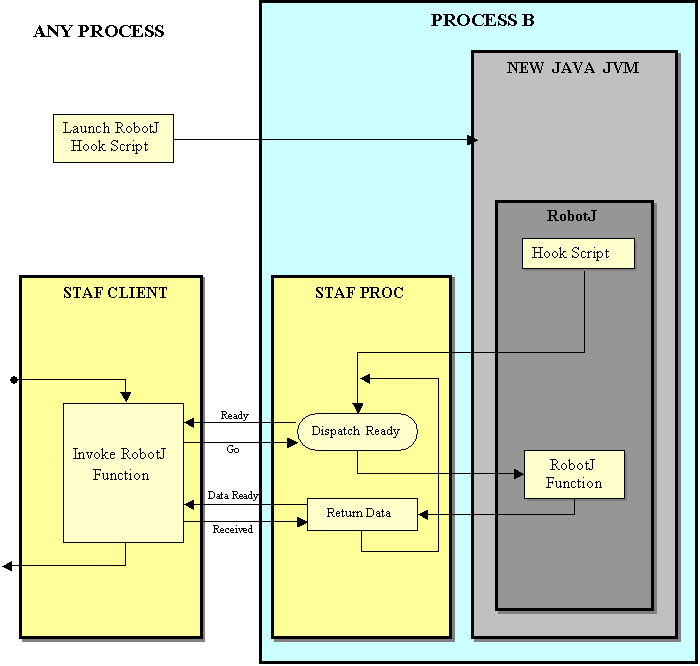
Fig. 2 shows what might not be readily apparent to all developers. Classic and the Java JVMs are running in different processes on the system. Thus, it requires special care and data synchronization. This is all handled via STAF and our interfacing libraries and classes. The separate processes will each have a separately loaded instance of a STAF Client. STAF allows us to synchronize our transferring of data and commands between the two processes.
Although not shown in Fig. 2, it is worth noting that the AUT being tested is in yet another separate process.

|
| Fig. 2 |
Now the fun part! Just how do we get Classic and RobotJ to work together? How do we gain access to all the API and GUI actions available to a RobotJ script and expose them to Classic and the outside world? Well...
The Reader's Digest version (shown in Fig. 3):
|
| Fig. 3 |
Again, although not shown in Fig. 3, it is worth noting that the AUT being tested is in yet another separate process.
Overview Processes Thread